How to Edit Customer Billing Information
Last updated: August 19, 2026
Summary / Introduction
Learn how to update a customer's billing information, including payment methods and auto-charge settings.
Step-by-Step Instructions
Navigate to Customers: Click into the Customers tab
Select Customer: Click on the customer whose billing settings you want to modify
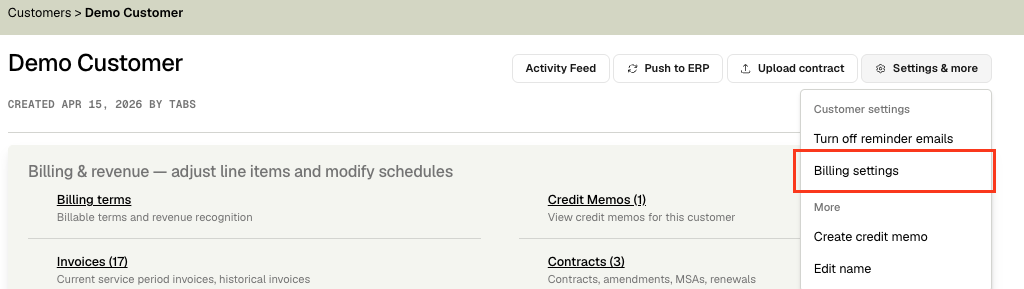
Access Billing Settings: Click the "Settings & more" button in the top right
Open Billing Settings: Select "Billing Settings" from the dropdown menu
Appy Changes:
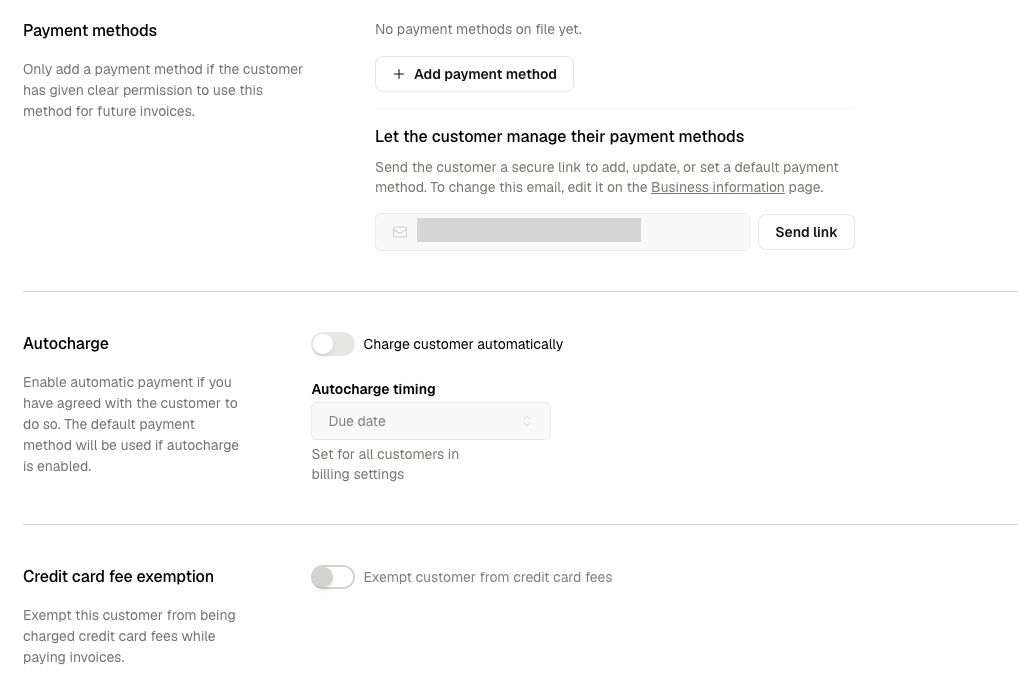
Payment methods: Click Add payment method to enter the customer’s card or bank details on a secure form. Only do this if they’ve given you permission to store and use it for future invoices. Alternatively, Send a self-service link (optional): Instead of updating the payment method yourself, click Send link next to "Let the customer manage their payment methods" to email the customer a secure, 7-day link.
Autocharge: Enable automatic payment if you have agreed with the customer to do so. The default payment method will be used if auto-charge is enabled.
Credit Card fee exemption: Exempt this customer from being charged credit card fees while paying invoices.
Tips & Best Practices
Tip #1: Verify all billing information is correct before saving changes
Tip #2: Review auto-charge settings to ensure they align with the customer's billing preferences