Resolve invoices showing bank fees as a balance due
Last updated: April 16, 2026
If you notice credit card fees appearing as unpaid or overdue invoices in your system, this is typically a processing issue that needs to be resolved manually.
Why this happens
Credit card fees are normally processed automatically through Stripe and should not generate separate invoices. When CC fee invoices appear as unpaid, it usually indicates a processing error or legacy configuration issue.
How to resolve unpaid CC fee invoices
To fix unpaid credit card fee invoices:
First, check your Stripe account to verify if the charge went through successfully
If the charge processed in Stripe, you can manually resolve the invoice in your system:
Navigate to the overdue invoice
Click "Need to do something else?"
Select "Mark invoice as done"
Map the balance due to bank fees accordingly
Bank Fee Account Mapping
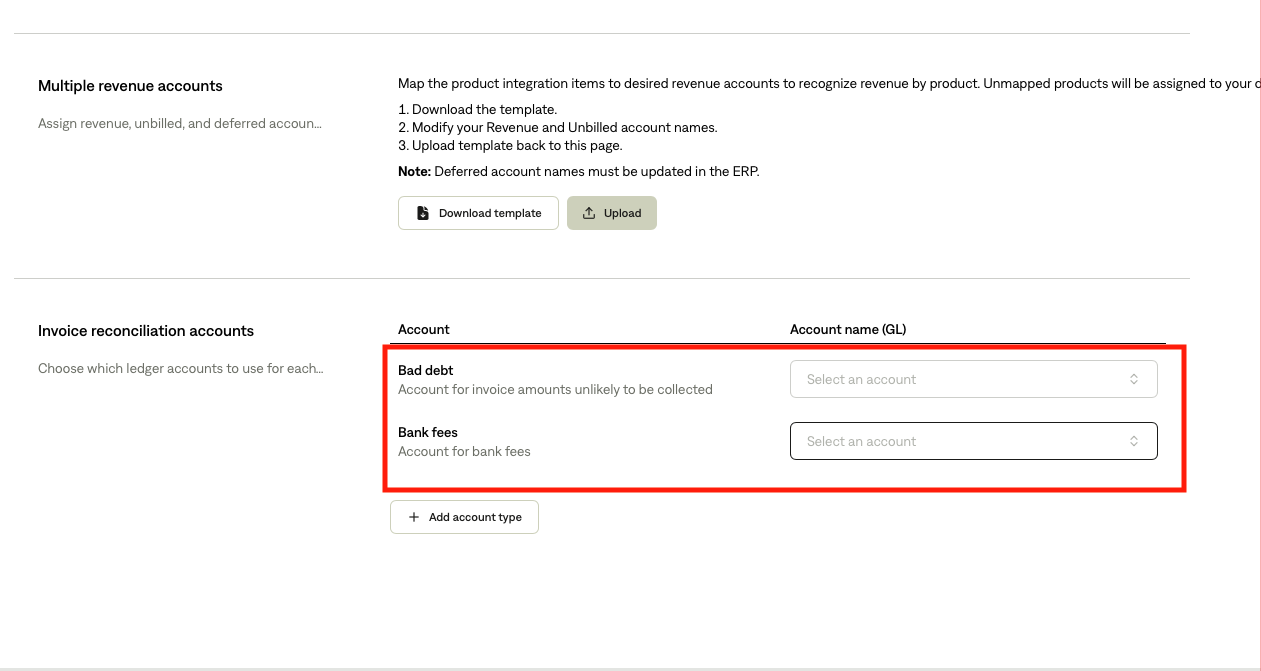
Please note: to be able to map unpaid bank fees to the accurate bank fee account in your GL, you must map the account at the Tabs integration setup level.
Head to integrations tab
Click manage on the ERP tile
Scroll down to the invoice reconciliation accounts section where you can map the appropriate accounts