Invoice Email Event Tracking
Last updated: April 16, 2026
Tabs now tracks the full journey of your invoice emails, including whether they were delivered, opened, or bounced. These events appear directly in the invoice Activity feed, giving you clear visibility into what happened after an invoice was sent.
Why This Matters
This feature helps your Support and Finance teams:
Confirm that customers received an invoice
Troubleshoot delivery issues with speed
Follow up confidently when customers have not opened an invoice
Eliminate guesswork and manual debugging
You can now see exactly what occurred when an invoice email was sent.
How It Works
There are no changes to how you send invoices.
Tabs simply adds more visibility behind the scenes.
For every invoice email sent to your customers, Tabs logs:
Delivered: The email reached the customer’s inbox
Opened: The customer opened the invoice email
Bounced: Delivery was not successful
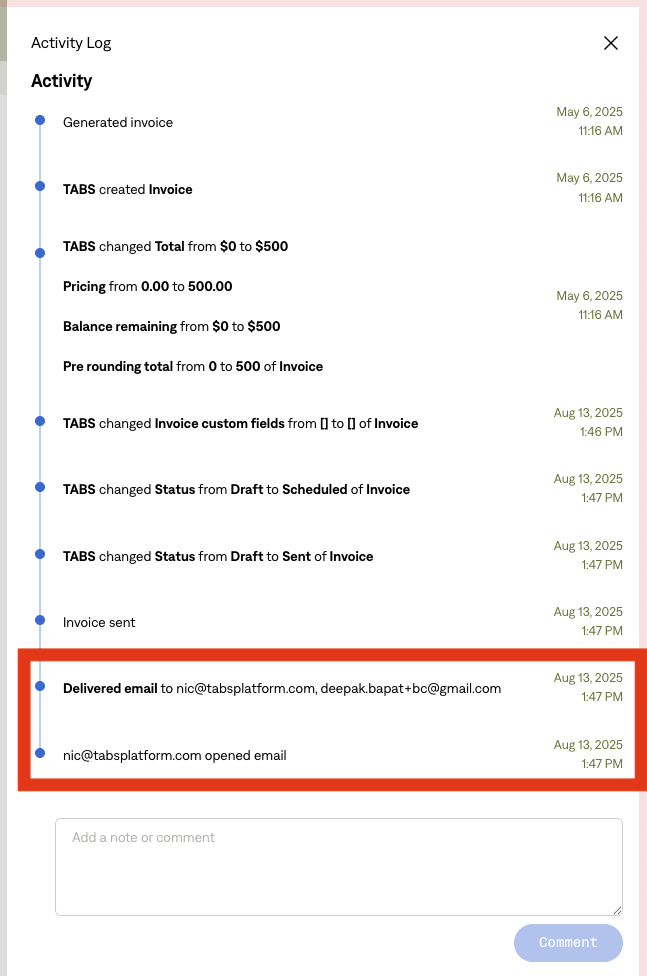
These events appear in the Activity section on both invoices and customers.
Note: Tabs email addresses are automatically excluded from these logs.
What You Will See in the Activity Feed
Examples of how email events are displayed:
Delivered email to john@example.com
john@example.com opened email
Failed to deliver email to john@example.com
Each entry includes the recipient, the event type, and a timestamp.
Email Events Tracked
Event | Description | Displayed in Activity |
Email Delivered | The email reached the customer’s inbox | ✔ |
Email Opened | The customer opened the email | ✔ |
Email Bounced | The email did not deliver successfully | ✔ |
Multiple Opens | The customer opened the email more than once | First open only |
Missing Metadata | The email was missing required metadata | Logged internally only |
What Is Not Included
This feature does not track:
Click tracking or other advanced engagement
Reply behavior
Reminder or dunning email tracking
Automatic retries for failed deliveries
Benefits to Your Team
Clear insight into whether customers received or opened their invoices
Reduced time spent debugging email issues
More informed and confident follow-up
Stronger and more reliable financial communication