How Automated SSP Works
Last updated: September 21, 2026
Standalone Selling Price (SSP) is required under ASC 606 to allocate a contract's total transaction price across each distinct performance obligation. Tabs automates this end-to-end — including usage-based products.
Overview
The SSP workflow has three stages that flow from memo to revenue:
Define — Create an SSP memo with effective date, methods and values for each product.
Activate — Approve the memo to govern SSP allocation per memo configuration.
Apply — Contracts signed on or after the effective date automatically allocate the total transaction price to each performance obligation using the relative SSP method.
Step by Step Guide
Prerequisites: In order to use automated SSP, you must have:
Product catalog configured
Contract signed for signature date extraction
Contract processed with performance obligations defined
Step 1. Define SSP Memo
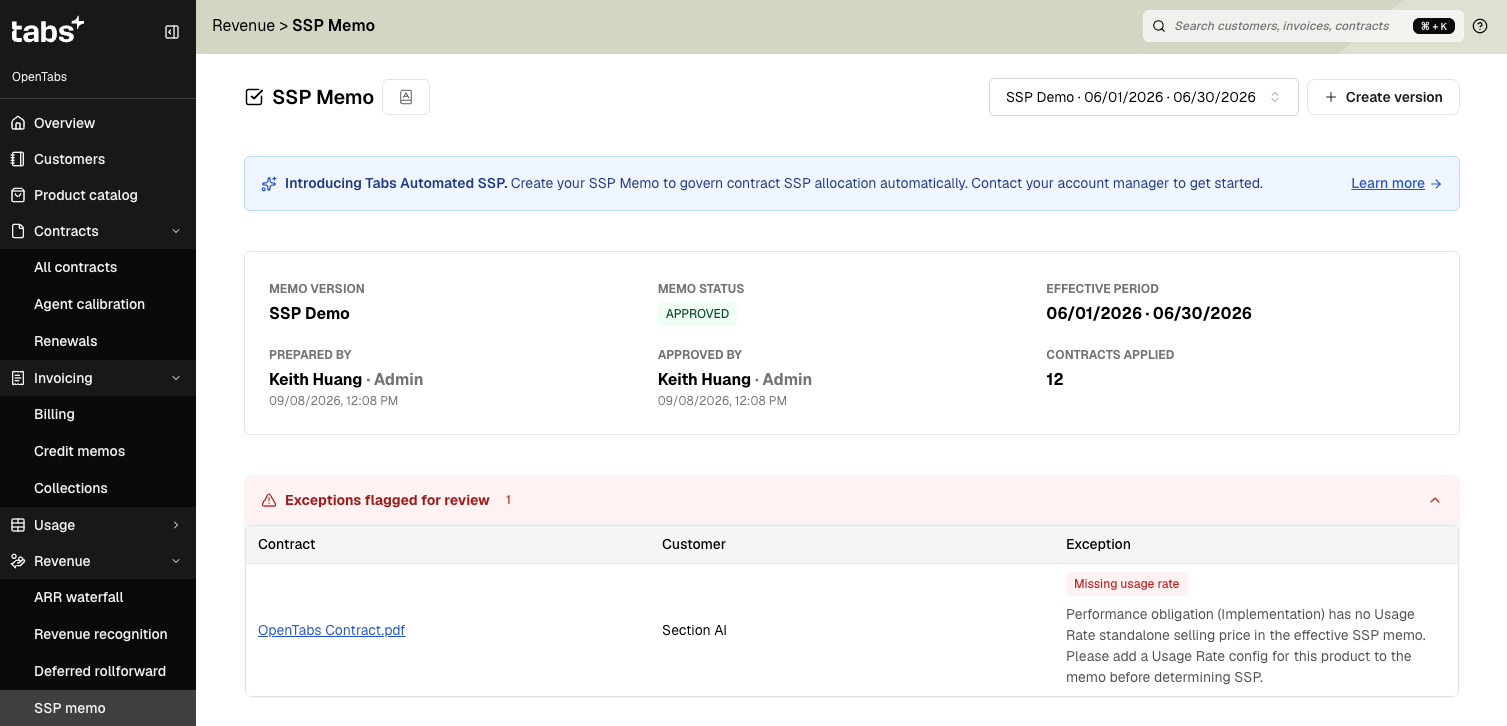
Go to SSP Memo from the side navigation.
Download template .xlsx file
Fill out the template per your existing SSP configuration
Memo details tab
Label: name your memo (ex: 2026 SSP).
Accounting memo: any relevant information about this SSP configuration.
Effective date: defines whether a contract will follow this memo based on inception date (signature date when available, or the earliest performance obligation start date if not). For example, SSP v1 will only apply to contracts signed on or after its effective date of 1/1/2026. This SSP version won’t apply to a contract signed on 12/25/2025.
Products tab
Product: auto populated from the product catalog. Do NOT change.
SSP Method: defines an estimation method and value for every product in the catalog. Supported methods:
Flat products
Observable — Use sales price from the contract as SSP. Recommended for brand new products without prior history to define SSP.
FMV Fixed — A constant dollar value set constant regardless of the sales price.
FMV % of Deal — SSP as a percentage of the total transaction price, used when the item's value scales with deal size. Optional minimum/maximum to set a floor or cap.
Min/Max Range — The minimum and maximum range of SSP. If the sales price falls outside the range, SSP is clamped to the nearest bound.
Min/Max Midpoint — Similar range, different resolution: if the sales price falls outside the min/max range, SSP is set to the midpoint of the range (average of min and max), rather than clamped to the nearest bound. If the sales price falls within the range, SSP equals the sales price.
Pass-Through — Excludes the product's sales price from the total transaction price pool subject to SSP allocation entirely (e.g., pass the token or ads cost through at exact dollar-for-dollar per ASC 606-10-55-38(b)). The remaining products are allocated across what's left after the pass-through amount is carved out.
Residual — SSP equals the remaining transaction price after all other product SSPs are carved out. A fallback value is used when the residual pool is exhausted. Used only when direct evidence is unavailable and other methods are not appropriate.
Usage-based products
Usage Rate — For usage-based products, SSP is calculated as SSP-per-unit rate × the performance obligation’s estimated quantity. Use the known or estimated quantity for fixed consideration unless the performance obligation qualifies for the ASC 606-10-55-18 “right-to-invoice” practical expedient, in which case usage revenue is recognized as consumed without a relative SSP allocation.
Min/Max Midpoint Usage — Same logic as Min/Max Midpoint, but for usage-based products. The range is defined by the per-unit rate, and SSP is determined based on the product’s unit price.
Carve out- Usage — Excludes the usage product's per-unit-rate x the performance obligation’s estimated quantity from the total transaction price pool subject to SSP allocation entirely. The remaining products are allocated across what's left after the estimated usage amount is carved out.
SSP Value
Default Unit — For FMV Fixed, Min/Max Range, and Min/Max Midpoint, Pass-Through methods, SSP is defined per unit and multiplied by contract quantity: SSP = SSP/unit × quantity (and the min/max bounds scale the same way before midpoint/clamping logic applies).
Default Cadence — SSP is default per month pricing so that Tabs can multiply it by the number of periods in the billing term.
Notes
Optional field to describe the rationale used for each SSP method and value.
Upload template and click next.
Once processed, review the SSP memo. Repeat prior steps if there's an error.
Upload support files: Optionally, upload relevant supporting documentation (analysis workbooks, pricing studies) for audit readiness.
Approve the SSP memo to activate.
That's it! Tabs will now automatically apply the SSP memo to eligible contracts and allocate total transaction price to each performance obligation in the following steps.
Step 2. Automatic Contract Application
⚠For performance obligations using the Output Based recognition pattern, enter the estimated quantity and tracking event when processing the contract. This quantity is then used to calculate the revenue pro rata to the events uploaded as output get satisfied over the contract.
When a contract is signed, Tabs automatically determines if it's subject to SSP allocation based on the contract's inception date (signature date).
In the cases where signature date is not available, Tabs will fall back to the earliest performance obligation date to determine the SSP application and flag the contract in the exception list on SSP Memo page and the contract details page.
Step 3. Automatic SSP Determination & Allocation
Each contract's Revenue tab shows the SSP determination and allocation waterfall so you can see exactly how revenue was allocated.
For each contract, the SSP engine runs a two-phase process:
Phase 1: Determine SSP for each performance obligation
Each performance obligation’s SSP is calculated using the method defined in the SSP memo, based on billing quantity and cadence (if applicable). Tabs computes pass-through and carve-out methods first, then calculates the transaction price pool subject to SSP allocation by excluding pass-through and carve-out amounts.
Phase 2: Allocate transaction price
The total transaction price (net of any pass-through and carve out amounts) is allocated to each performance obligation using the relative SSP method:
Allocated transaction price = (SSP / Total SSP) × Total Transaction Price
Each performance obligation's allocation percentage reflects its relative SSP value. The allocated amount becomes the revenue basis recognized for that performance obligation.
Example
Total Transaction Value = $20,000 per year
3rd Party Token $1,000 per year
Pass-through5 Workshop @ $520 each = $2,600
Carve out
Total pool subject to allocation = $20,000 - $1,000 - $2,600 = $16,400
Performance Obligation | Sales Price | SSP | Allocation % | Allocated |
|---|---|---|---|---|
Setup Fee | $2,000 | $2,500 | 13.81% | $2,265 |
Platform Fee | $12,000 | $13,200 | 72.93% | $11,960 |
Add-on Fee | $2,400 | $2,400 | 13.26% | $2,175 |
Total | $16,400 | $18,100 | 100% | $16,400 |
Notice the contract's total sales price ($16,400) differs from total SSP ($18,100) after pass-through and carve out. The discount is spread proportionally so each obligation's allocated revenue is lower than its SSP by the same ratio.
Step 4. Automatic Revenue Recognition
After allocation, each obligation's allocated amount is recognized based on its recognition pattern:
Straight-line: recognizes revenue pro-rata across the a performance obligation’s service periods.
Output-based: recognizes revenue as a share of allocated transaction amount, based on units delivered relative to the performance obligation’s estimated quantity. This pattern supports several use cases:
Single Milestone: full amount recognized when one unit of usage.
example: recognize one time implementation $10,000 when it’s doneAllocated Transaction Value
$10,000
Estimated Quantity
1
Revenue when uploading 1 unit usage
$10,000 x (1/1)
Multiple milestones: divided evenly across a fixed number of milestones.
example: project has 4 milestones with revenue recognized equally.
Allocated Transaction Value
$10,000
Estimated Quantity
4
Revenue when uploading 1 unit usage
$10,000 x (1/4)
Continuous Progress: recognized proportionally to a running % of progress.
example: project is tracked by % of progress.Allocated Transaction Value
$10,000
Estimated Quantity
100
Revenue when uploading 15 unit usage
$10,000 x (15/100)
Audit Trail
Every SSP memo, its approval history, applied contracts, and allocation calculations are retained for full ASC 606 auditability. Exceptions are surfaced with explanations on the SSP memo page and in the contract’s Revenue tab for internal control review and correction.
What happens when SSP is updated quarterly or yearly?
A new SSP memo version can be created with a new effective date, updated products, methods and values. Once approved, it populates an end date for the prior version and supersedes it going forward.
Existing contracts are not re-allocated. SSP is locked at contract inception per ASC 606-10-32-14. Only contracts signed on or after the new effective date use the updated SSP values.