Autocharge timing
Last updated: September 22, 2026
Autocharge timing controls when Tabs automatically charges customers who have Autocharge enabled.
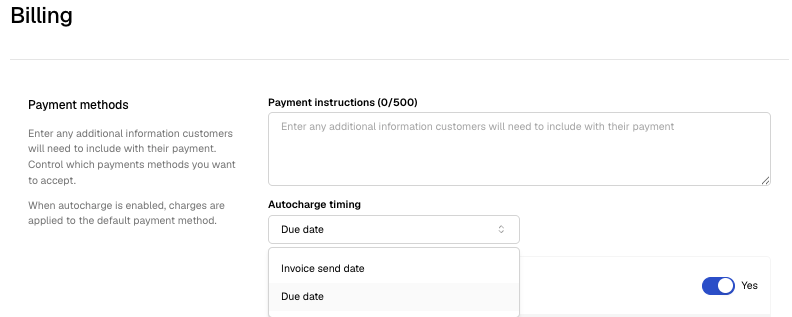
Tabs supports two Autocharge timing options:
Invoice send date — the customer is charged when the invoice is sent.
Invoice due date — the customer is charged on the invoice’s due date, based on the invoice’s payment terms. For example, if an invoice has Net 30 terms, Autocharge runs 30 days after the invoice is issued.
When to use each option
Use invoice send date if you want payment collected as soon as the invoice is sent, regardless of the invoice’s net terms.
Use invoice due date if you want Autocharge to respect payment terms such as Net 15, Net 30, or Net 60.
How to change Autocharge timing
Go to Billing settings.
Find the Autocharge timing setting.
Choose one of the available options:
Invoice send date
Invoice due date
Save your changes.
Important notes
Autocharge timing is a global billing preference, so changing it affects Autocharge behavior broadly rather than for only one customer.